
The Catalyst for an Upgrade
When I finally decided to upgrade from running an Ubuntu server on an old desktop to a full-fledged virtualization server, I knew the hardware choice would be very important for the future of this project. I wanted the freedom to experiment with different things and learn a lot, so the server had to be able to run some stuff. But it also couldn’t cost too much, both right away and in the long run, as I am still a student.
My goals were clear: replace my aging media server, host cloud services, and leave enough headroom to run other experiments on different VMs.
In this first post, I’ll walk you through my component choices, the logic behind them, and some stupid things I found out along the way.
The Skeleton: ASRock B760 Pro RS/D4
When I started looking for a motherboard, I was thinking about buying an enterprise board. But as I quickly learned, those servers idle at wildly high wattages. Because I did not want to pay too much extra for electricity1, I started looking at consumer-grade boards.
I had two requirements: it had to support DDR4 RAM, because DDR5 was so expensive, and it needed enough PCIe lanes for the HBA card and the network card I wanted to add. That is how I came across the ASRock B760 Pro RS/D42. It fit the bill with 4 x DDR4 DIMM slots, 2 x PCIe 4.0 x16, 1 x PCIe 3.0 x16 and 1 x PCIe 3.0 x1 slots.
After that, I started hunting for DDR4 RAM as fast as possible: it was December, I was afraid prices would keep skyrocketing3, and it looked like not all prices had ‘stabilized’ on the second-hand market yet. I first found a 32GB stick of Kingston FURY 3600 MHz4 for 50 euros, and another one for 150 euros. But I could not test them right away, because my motherboard had not arrived yet. That turned into a big problem later on: the first stick I bought did not work, and because I had bought it a month earlier, I could no longer return it.
Luckily, I found another stick for 160 euros. I could have ended up with 2x32GB of RAM for only 200 euros, but that would have been too good to be true. In the end, I paid 310 euros for two working sticks and another 50 euros for a broken one. Even though that was more than I had hoped, it was still only 70% of the price in a shop.5
The Brain: Intel Core i5-13500
For a modern media server, the “holy grail” is hardware-accelerated transcoding. I wanted to avoid a dedicated GPU because of its high idle power draw and the massive extra cost. That requirement led me straight to Intel QuickSync.
While the Intel Core i5-12400 is a very capable 6-core chip, I opted for the Intel Core i5-135006. This processor has a hybrid design with 6 Performance-cores (P-cores) and 8 Efficient-cores (E-cores), for a total of 14 cores and 20 threads. It gives a 28% to 91% increase in multi-core performance over the i5-124007, depending on the benchmark, which is crucial for media and heavy container workloads. On top of that, the i5-13500 has Intel UHD Graphics 770, which includes two Multi-Format Codec (MFX) engines8. That allows for significantly more simultaneous 4K transcodes than the single engine in lower-tier chips.
The Storage: SAS Seagate Exos X12 12TB
I made a classic rookie mistake when I picked up six used Seagate Exos X12 12TB drives9: they were enterprise-grade SAS (Serial Attached SCSI), not SATA. Standard consumer motherboards do not speak SAS.
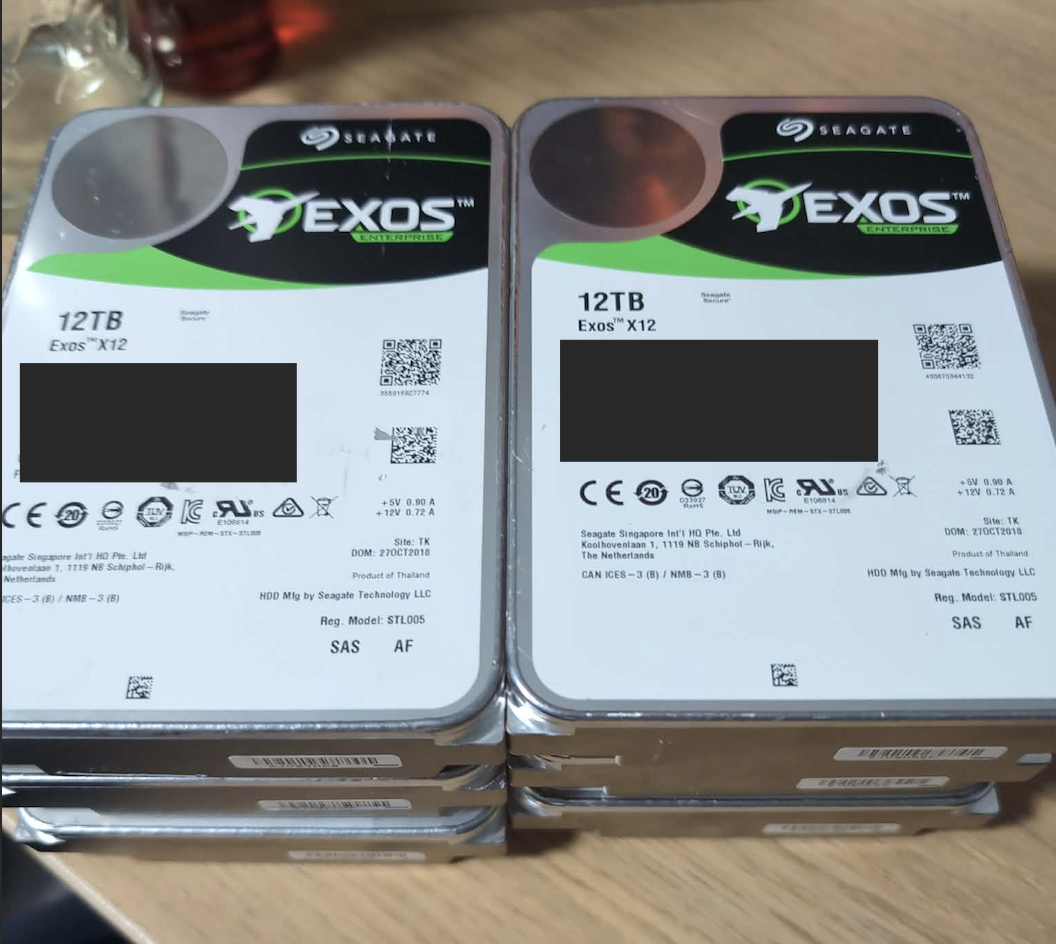 Six Seagate Exos X12 SAS drives connected to the LSI 9300-8i HBA.
Fortunately, the fix was straightforward. Someone on a homelab Discord server told me I could just buy an LSI 9300-8i Host Bus Adapter (HBA) in IT mode from eBay10. It had to be in IT mode because ZFS needs raw, direct access to the disks to do its magic11.
Fast Storage: Kingston NV3 1TB NVMe
For the Proxmox OS and fast VM storage, I added a 1TB Kingston NV3 (SNV3S1000G) NVMe SSD12. A flagship drive is tempting, but this Kingston gives great PCIe 4.0 speeds that are more than enough for Proxmox and several VMs at once, while staying well within a student budget.
Chassis and Power
I housed the whole build in a sturdy Inter-Tech 4U-4408 rackmount case13. Its built-in backplane supports SFF-8643 connectors, which made it simple to wire the six SAS drives cleanly to the HBA. For power, I repurposed a Seasonic Focus GX-750 (80+ Gold). It will be less efficient than a lower-wattage PSU, but it gives me the headroom to add more drives and other components in the future.
Final Spec Sheet
To sum up, here is the complete hardware list for this homelab build:
| Component Type | Component Name | Amount |
|---|---|---|
| Processor | Intel Core i5-13500 | 1 |
| Motherboard | ASRock B760 Pro RS/D4 | 1 |
| RAM | Kingston FURY 32GB DDR4-3600 | 2 |
| HBA | LSI 9300-8i (flashed to IT mode) | 1 |
| OS Storage | Kingston NV3 1TB NVMe SSD | 1 |
| Mass Storage | Seagate Exos X12 12TB SAS HDDs | 6 |
| Power Supply | Seasonic Focus GX-750 (80+ Gold) | 1 |
| Chassis | Inter-Tech 4U-4408 Rackmount Case | 1 |
1. Eurostat. (2026). Electricity Price Statistics for Household Consumers in the EU. ec.europa.eu ↩︎
2. ASRock Inc. (2026). B760 Pro RS/D4 Product Specifications and Memory Support List. asrock.com ↩︎
3. TrendForce News. (2026, January). DRAM Market Update: DDR4 Prices Surge 172% Amid Global Supply Shortage. trendforce.com ↩︎
4. Kingston Technology. KF436C18BBK2/64 Datasheet. kingston.com ↩︎
5. Tweakers. Kingston Fury Beast KF436C18BBK2/64 Pricewatch. tweakers.net ↩︎
6. Intel Corporation. (2026). Intel® Core™ i5-13500 Processor Technical Specifications. ark.intel.com ↩︎
7. NanoReview. Intel Core i5-13500 vs Intel Core i5-12400. nanoreview.net ↩︎
8. Intel Developer Zone. (2025). UHD Graphics 770: Architecture and Multi-Format Codec (MFX) Engines for Transcoding. software.intel.com ↩︎
9. Seagate Technology. (2024). Exos X12 SAS Interface Specifications and Power Management. seagate.com ↩︎
10. Broadcom / LSI. (2024). SAS 9300-8i Host Bus Adapter Product Brief. broadcom.com ↩︎
11. TrueNAS Community. What’s all the noise about HBAs, and why can’t I use a RAID controller? truenas.com ↩︎
12. Kingston Technology. (2026). NV3 PCIe 4.0 NVMe SSD Product Specifications. kingston.com ↩︎
13. Inter-Tech GmbH. (2025). 4U-4408 Rackmount Chassis. inter-tech.de ↩︎